


Skin Bliss: Skincare Routines
4.5144.00 Reviews
App Specs
- Version
- 5.0.6
- Updated On
- License
- Free
- Downloads
- 1,000,000+
- Developer
- skinbliss
- Categories
- Beauty
- Platform
- Android, iOS
Screenshots
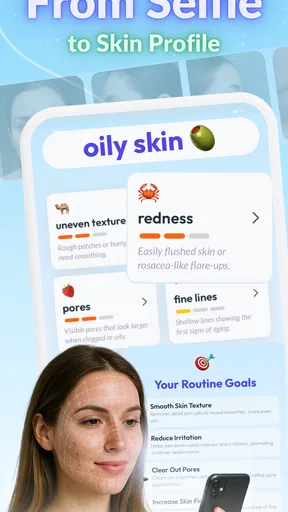
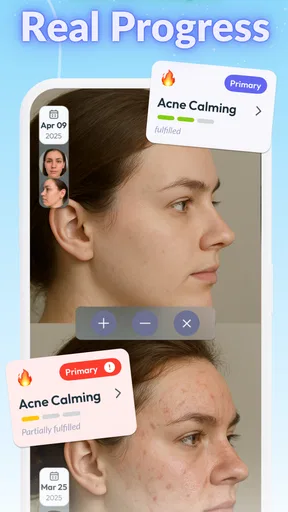
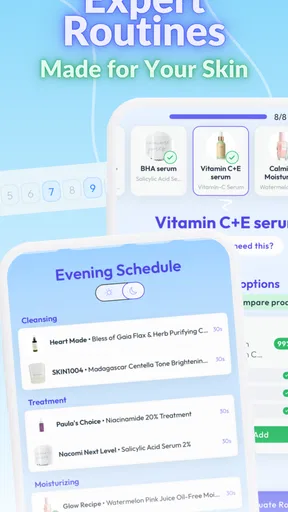
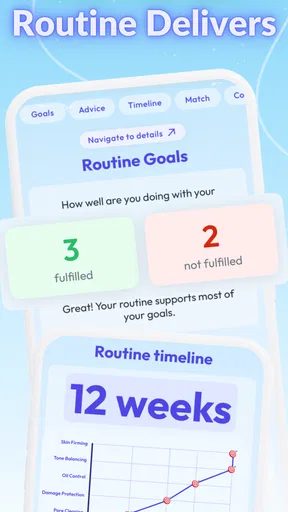
 Analysis by AppCompare
When I try a skincare app, I want it to make everyday decisions clearer, not turn my bathroom shelf into a research project. Skin Bliss: Skincare Routines is aimed at that practical middle ground: it brings product ingredient scanning, routine planning, tracking, and face analysis into one beauty app. I find it most useful as an organizer and learning aid, rather than a substitute for a dermatologist or a promise that a particular product will solve a skin concern.
Where people can get stuck
The first hurdle is often not the app itself but the information a person needs to give it. A routine recommendation can only be as relevant as the answers about skin type, concerns, and products already in use. If you are unsure whether your skin is dry, sensitive, or simply reacting to a new product, it is better to answer cautiously than to choose a label just to get through setup. Treat the result as a starting point you can revisit, not a diagnosis.
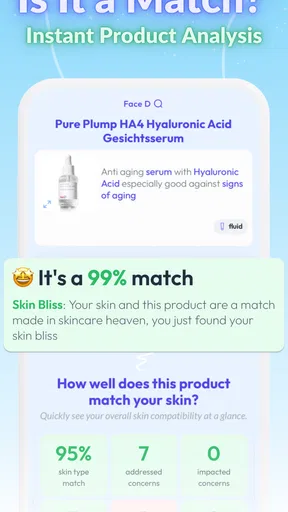
Product scanning also works best when the item is easy to identify. Keep the packaging nearby and make sure the barcode is visible; if scanning does not help, ingredient checking is only useful when you can match the product to the right information. I would not make a purchase or discard a product based on one flagged ingredient alone. Ingredient context, concentration, and your own history matter, and an app’s warning is a prompt to look closer rather than a medical verdict.
Setup checks that make the advice more useful
Skin Bliss is free to download, with optional in-app purchases ranging from $1.99 to $49.99 per item. Before you settle into a routine, take a few minutes to enter the products you actually use, including occasional treatments. Leaving out a product can make a suggested schedule less practical, especially if you are trying to work out how a new item fits alongside an existing routine.
A helpful approach is to begin with a simple, accurate profile instead of trying to describe every possible skin concern. Then compare the suggested routine with your real habits: what you own, what you use consistently, and what you are prepared to keep doing. That quick reality check can prevent an attractive-looking plan from becoming an unrealistic list of steps. The app is suitable for Everyone, but skincare recommendations still need common sense; age suitability does not mean every product is right for every person.
Recovering a routine when plans change
Skincare routines rarely stay perfectly consistent. You might run out of a cleanser, travel with fewer products, or decide to pause something that seems irritating. I find tracking most valuable when I use it as a record of what I actually did, rather than trying to maintain a flawless streak. If your routine changes, update what you use and judge the next few weeks against that new baseline instead of comparing unlike periods.
For an everyday example, imagine adding one new moisturizer while keeping the rest of your routine steady. Record the change, keep the other steps familiar, and give yourself a useful reference point before adding another new product. If your skin reacts, that simpler timeline may help you spot what changed. It cannot prove the cause, but it is more informative than trying several new items at once and then guessing which one mattered.
Worth Reading Before You Choose

EA SPORTS FC Mobile 26 Is a Bigger Football Game, but It Takes Time

Flipboard Shows What News Apps Must Do Beyond the Feed

Switching to Android Auto Means Rethinking Your Driving Routine

Google Calendar Makes a Crowded Week Easier to Manage

Ludo King Makes the Most of the Minutes Between Plans

Baby Panda World Brings Quick Play to Modern Phones, but Its Game Library Feels Busy
When the app is not the cause—or the answer
If a scan or recommendation seems unhelpful, first check whether the product details and your profile are accurate. A barcode may identify an item without telling the whole story of how your skin responds to it. Likewise, face analysis can offer a structured point of reference, but lighting, expression, and day-to-day skin changes can affect what you see. I would use it for context, not as a precise measurement or a reason to worry about normal fluctuations.
Skin Bliss is not the right choice for someone who wants a clinician to diagnose a rash, or who expects an app to guarantee clear skin. Persistent discomfort or a strong reaction calls for appropriate medical advice, not another round of routine adjustments. It may also be unnecessary if you already have a simple routine that works and do not want to track products or explore ingredients. In that case, a basic notes app or paper list can be quicker and less distracting.
Getting Started with Skin Bliss
First things first, downloading Skin Bliss was a breeze. Available on both Android and iOS, it’s as easy as a few taps and you’re good to go. Once you open the app, you're greeted with a clean, user-friendly interface that feels like it was designed just for you. No clutter, no chaos—just pure bliss!
The registration process is quick and painless. The app asks you some basic questions about your skin type, concerns, and the products you currently use. This might seem like a lot at first, but trust me, it's worth it. This information helps the app customize a skincare routine that's tailor-made for you.
Exploring Features
One of the coolest features of Skin Bliss is its ability to analyze product ingredients. You just scan the barcode of your product, and bam! The app gives you a detailed breakdown of what’s inside. It also flags any potentially harmful ingredients. This is a game-changer for anyone conscious about what they're putting on their skin.
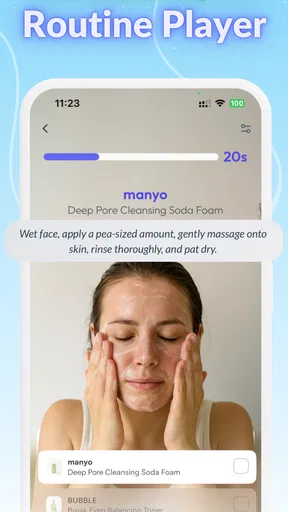
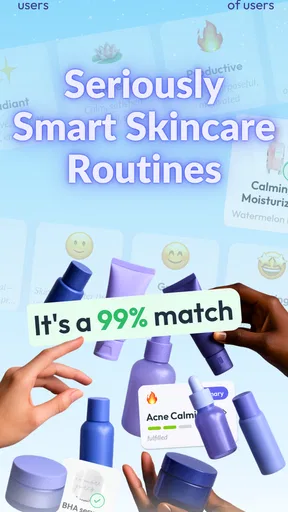
The app also offers personalized skincare routines. Based on your initial questionnaire, it suggests products and routines that suit your skin type and concerns. It’s like having a personal skincare consultant in your pocket.
And if you’re a bit of a social butterfly, you’ll love the community feature. Here, you can share your experiences, get tips from other users, and even follow skincare experts. It’s a great way to stay motivated and learn from others on the same journey.
Daily Routine and Reminders
One of my favorite features of Skin Bliss is the daily routine and reminders. You can set up your routine and the app will remind you when it’s time to cleanse, tone, moisturize, and whatever other steps you’ve got going on. This is perfect for those of us who tend to forget the little things in our busy lives.
The app also tracks your progress. It’s incredibly satisfying to see how your skin has improved over time, and it’s all documented right in the app. This feature adds a personal touch and keeps you engaged in your skincare journey.
Why Skin Bliss Stands Out
Skin Bliss comes from skinbliss, and its focus gives it a different feel from a generic beauty community or a plain reminder tool. With an average rating of 4.4 from around 9,200 ratings and more than a million installs, it has clearly found an audience. Those figures are a useful sign of reach, but they do not tell me whether its suggestions will suit an individual’s skin; the quality of your own profile and the care you take interpreting recommendations matter more.
Compared with the usual alternatives, its advantage is the attempt to connect ingredient checking with routines and progress tracking. A barcode-scanning ingredient reference can answer a narrow question about a product, while a habit tracker can nudge you to follow a schedule; Skin Bliss brings those kinds of tasks together with personalized guidance. The trade-off is that an all-in-one app asks you to maintain more information. If you only want a quick ingredient lookup, a dedicated reference may feel faster. If you only need reminders, your phone’s calendar may be enough.
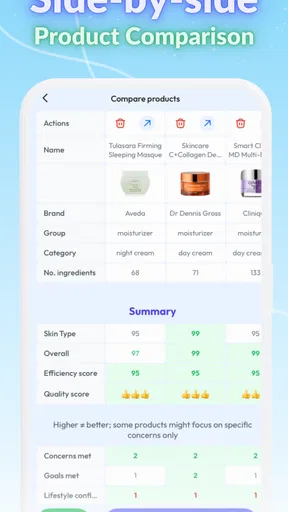
One practical tip is to use the scanner before shopping, not only after a product is already in your cabinet. You can compare ingredients with your own sensitivities and existing routine, then make a more considered choice. I would still read packaging and check the product name carefully: a scan is a convenient research step, not a guarantee that a formula will suit you or that every concern has been captured.
The community can be useful for discovering how other people think about routines, but I would keep personal experience separate from professional advice. Someone else’s success with an ingredient does not predict your result. I’d use community discussion for ideas and questions, then make changes conservatively, particularly if my skin is reactive. This keeps the social side helpful without letting popular opinions dictate a routine.
Choosing a routine you can keep
The most revealing test is whether the routine fits an ordinary week. A long sequence may look thorough on screen but become hard to follow when you are tired or in a hurry. I would start with the steps I already do reliably, set reminders only for the moments I tend to forget, and add complexity only when there is a clear reason. That approach makes tracking more honest and avoids turning missed reminders into a feeling of failure.
Progress tracking is most useful when you compare like with like. If you take notes or review changes, remember whether you also changed products, routine frequency, or other habits during that period. Skin can vary for many reasons, so a better-looking week does not automatically prove that one product caused the change. The app can help you keep a timeline; interpreting that timeline still takes patience.
Some people may wonder whether they need to pay to get value from the app. It is free to download, and in-app purchases are available, but I would first decide which parts of the experience genuinely help you before spending anything. If your main goal is simply to keep a routine visible, begin with that use rather than assuming every paid option is necessary. The current version is 5.0.6, and the app’s listed minimum operating-system requirement is 7.0, which is worth checking before installing on an older device.
Another reasonable question is whether to trust the face analysis. I would treat it as one more way to observe skin, not a clinical assessment. Use it under similar conditions if you want comparisons to be meaningful, and do not let a single result outweigh how your skin feels or advice from a qualified professional. That cautious mindset applies to recommendations and ingredient flags too: they can help guide questions, but they should not make health decisions for you.
Why Skin Bliss Stands Out
So, what makes Skin Bliss stand out from the sea of other skincare apps? It’s the combination of personalization, community, and expert advice all rolled into one. The app doesn’t just tell you what to do; it educates you on why you’re doing it. That knowledge empowers you to make informed decisions about your skincare routine.
Moreover, the app’s minimalist design and straightforward navigation make it accessible to everyone, whether you’re a skincare newbie or a seasoned pro. The developers clearly understand that less is more, focusing on delivering value rather than overwhelming you with unnecessary features.
Final Thoughts
If you’re serious about your skincare routine, Skin Bliss: Skincare Routines is definitely worth checking out. It’s like having a skincare guru in your pocket, guiding you every step of the way. Whether you’re looking to revamp your routine or simply stay up-to-date with the best products for your skin type, this app has got you covered.
So go ahead, give it a try, and watch your skin transform into its most radiant self. You’re just a download away from blissful skin days!
Pros
- Comprehensive ingredient analysis.
- Personalized skincare routine tips.
- User-friendly interface design.
- Regular updates with new features.
- Expert insights and advice included.
Cons
- Limited offline functionality.
- In-app purchases for premium features.
- Occasional slow loading times.
- Requires account creation to access.
- Some features need internet access.
FAQs for Skin Bliss: Skincare Routines
What is Skin Bliss and how does it work?
Skin Bliss is a comprehensive skincare app designed to help users manage and optimize their skincare routines. It features a database of skincare ingredients, personalized routine suggestions, and product recommendations based on your skin type and concerns. The app uses advanced algorithms to analyze ingredients and provide insights into their benefits and potential side effects.
Is Skin Bliss suitable for all skin types?
Yes, Skin Bliss is designed to cater to a wide range of skin types, including oily, dry, combination, and sensitive. Upon registration, the app asks detailed questions about your skin concerns to tailor recommendations specifically for you. This ensures that the advice and products suggested are appropriate for your unique skincare needs.
How accurate is the ingredient analysis feature?
The ingredient analysis in Skin Bliss is based on a robust database of scientific research and user feedback. It evaluates each ingredient's safety, effectiveness, and potential allergens. While the app strives for high accuracy, it's always recommended to consult a dermatologist for personalized advice, especially if you have specific skin conditions.
Does the app offer any community features?
Yes, Skin Bliss includes community features where users can share experiences, tips, and reviews of skincare products. This interactive aspect helps users learn from others with similar skin concerns and discover new products and routines. The community is moderated to ensure helpful and respectful interactions.
Is Skin Bliss free to use, or does it require a subscription?
Skin Bliss offers both free and premium versions. The free version provides basic features like product recommendations and ingredient analysis. However, a subscription unlocks additional features such as personalized skincare routines, advanced ingredient insights, and ad-free experience. Users can choose based on their needs and preferred level of detail.


